
Before you start
- Admin access to Neowit Settings → Integrations.
- Access to your site in Glamox Connect with permission to create an API under Settings → API. If your site has no API page, Glamox support can create the API for you with the connection details from Step 1.
Glamox Connect sends to Neowit; Neowit never connects to Glamox.
Step 1: Create the integration in Neowit
- Open Settings → Integrations and click +.
- Pick Glamox Connect and give it a name, for example
Office lighting. - Click Add. The username and password become available once the integration exists, because its identifier is also the username Glamox Connect logs in with.
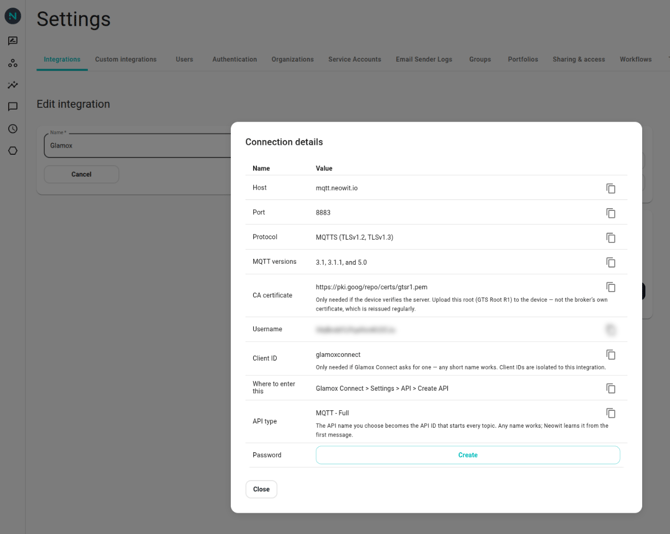
- Open the integration again and click Show connection details.
- Click Create next to Password and copy the value. It is shown once.
Step 2: Create the API in Glamox Connect
- In Glamox Connect, open Settings → API and click Create API.
- Choose the API type MQTT - Full.
- Give the API any name. Glamox Connect derives the API ID from it, and Neowit picks that up from the first message.
- Enter the connection details from Neowit:
| Glamox Connect asks for | Enter |
|---|---|
| Host | mqtt.neowit.io |
| Port | 8883, with TLS |
| Username | The Username from the connection details |
| Password | The password you copied |
| Client ID | Only if asked: any short name, such as glamoxconnect |
- Save, and make sure the API is Active.
Step 3: Check it worked
Glamox Connect describes every device it shares over the API, so they appear under Devices within a minute or two:
- One device per luminaire or sensor, with vendor Glamox. A luminaire with a built-in sensor is one device carrying both.
- The name is the one in Glamox Connect. An unnamed device keeps Glamox's placeholder, such as Unnamed Dali …, until you rename it there.
- The model is the Glamox system the device is on, such as DALI Complete or Wireless Zigbee.
- Gateways and access points don't become devices.
If nothing appears, check the API is active, then the username and password. You can create a new password at any time; the old one keeps working. If only some devices are missing, ask Glamox whether the API includes them.
What comes across
| Glamox reading | Recorded as |
|---|---|
| Light on or off | Lights on |
| Brightness | Lights dimming brightness |
| Illuminance | Illuminance |
| Temperature | Temperature |
| Occupancy | Motion detected |
| Active power | Electric power |
| Light source current and voltage | Electric current and voltage (diagnostic) |
| Maintenance fault | Equipment alarm (diagnostic) |
Glamox Connect sends a light's on/off and brightness only when they change, so a light nobody has switched or dimmed since you connected has no reading yet. Maintenance fault comes with every health update, about every five minutes.
Not recorded yet: colour temperature, emergency function and duration test results, driver temperature, burn hours and energy.
Rooms and floors
When a device is placed on a floorplan in Glamox Connect, Neowit stores the floorplan and room name on the device. Where onboarding offers Use existing data source, picking this integration there suggests a space per Glamox room and the floor it is on.
Connected and not connected
- A new device shows Unknown until Glamox Connect first reports on it, usually within five minutes, then Connected.
- Glamox Connect reports each device's own connection. A device it reports as not connected shows as Not connected.
- If Glamox Connect sends nothing for 30 minutes and doesn't answer a request to announce its devices within 5 more, its devices become Not connected with the reason No messages from Glamox Connect since and a time. The health monitor rolls these up into one ticket for the integration.
- As soon as Glamox Connect sends anything again, the devices return to what it last reported.
Removing a device
When a device is removed in Glamox Connect, it shows as Missing in Neowit. Its history stays. If it comes back, it is reconnected to the same device.