
What we require
The integration is intentionally strict about what it talks to:
-
TLS-trusted certificate. The server certificate must be signed by a CA in the public trust store. Self-signed and private-CA certificates are not accepted, even if you trust them on your own network. If your relay only has an internal CA, put it behind a public-CA reverse proxy (e.g. on Cloudflare or a small TLS-terminating relay you run) before connecting Neowit to it.
-
Either STARTTLS on port 587 or implicit TLS on port 465. Port 25 is rejected by the form.
-
AUTH LOGIN or AUTH PLAIN on the TLS-protected channel. The integration tries LOGIN first (Microsoft 365 only supports LOGIN), then PLAIN.
-
A From address the server is willing to accept as the envelope sender.
If your server doesn't meet all four, fix the server side first — Neowit won't try to work around them.
Setup
-
On the SMTP server, create a dedicated service account for Neowit's traffic. Don't reuse a human user's credentials. Give it whatever sender restriction you'd give a printer or scanner.
-
Generate a strong password — these credentials will sit in Neowit's database, encrypted at rest.
-
Confirm the server's certificate from outside your network. From any machine with openssl: openssl s_client -connect smtp.example.com:587 -starttls smtp -servername smtp.example.com
The output should show a certificate chain that ends at a public root CA, Verify return code: 0 (ok). If verification fails or the chain isn't public, sort that before continuing
-
In Neowit, open Settings → Integrations → Add integration → SMTP
-
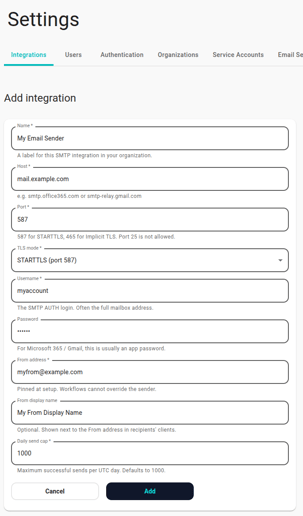
Fill in:
- Host — your SMTP server's hostname.
- Port — 587 for STARTTLS, 465 for implicit TLS.
- TLS mode — match the port.
- Username — the service account.
- Password — the service account password.
- From address — what envelopes will come from. Must be one the server accepts.
- Daily send cap — leave at 1000 unless you've thought about it. -
Click Save. The card flips to Connected within ~30 seconds.
Common pitfalls
-
smtp: server does not advertise STARTTLS — you connected to a port that doesn't offer STARTTLS. Switch to implicit TLS on 465, or pick the right port.
-
smtp: STARTTLS handshake: x509: certificate signed by unknown authority — the server's certificate chains to a CA that isn't in the public trust store. We won't connect to it; replace the cert.
-
smtp: STARTTLS handshake: x509: certificate is valid for X, not Y — the cert's SAN doesn't cover the hostname you typed. Fix the cert or use the hostname it's actually issued for.
-
smtp: no supported AUTH mechanism — the server doesn't advertise LOGIN or PLAIN. Some hardened relays only offer CRAM-MD5; we don't support that today.
-
Connect succeeds, sends fail with 5.7.1 sender denied — the server accepts our login but won't relay for the From address. Whitelist the address, or use a relay-friendly account.
-
Self-signed cert during a proof-of-concept.Don't ask us to add an insecure mode toggle — by design we won't accept self-signed certs even temporarily. Use a free Let's Encrypt cert or a stunnel-with-public-cert front-end.
Hosted relay providers
The well-known hosted relays work out of the box once you've collected their host/port/credentials:
-
AWS SES — host email-smtp.<region>.amazonaws.com, port 587 STARTTLS, IAM SMTP credentials.
-
Postmark — host smtp.postmarkapp.com, port 587 STARTTLS, Server Token as both username and password.
-
Mailgun — host smtp.mailgun.org, port 587 STARTTLS, the SMTP credentials shown in the domain dashboard.
-
SendGrid — host smtp.sendgrid.net, port 587 STARTTLS, username `apikey`, password is your API key.
Each of these enforces its own per-account quotas — the daily send cap on the integration is a Neowit-side belt-and-braces, not a substitute for the provider's own limits.