
Before you start
- An SMTP server you own or are allowed to relay through (your provider's, your IT department's, an SMTP-as-a-service like SendGrid).
- The host, port, and TLS mode (
STARTTLSon port 587, orIMPLICIT_TLSon port 465). Port 25 is rejected. - SMTP credentials — username and password. OAuth (XOAUTH2) is not yet supported.
- A From address that the relay will accept. Neowit pins this at setup so workflows can't impersonate other senders.
- Admin access on the Neowit organization.
Connect SMTP
- In the left navigation, open Settings → Integrations.
- Click Add integration and pick SMTP.
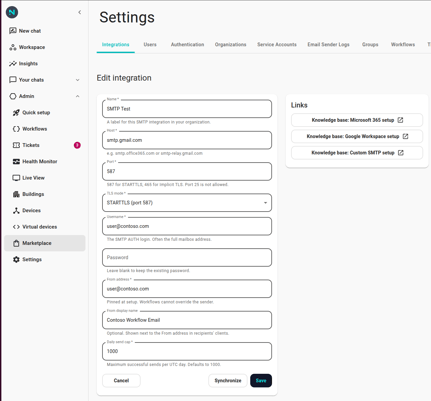
- Fill in:
- Host — e.g.
smtp.office365.com,smtp.sendgrid.net. - Port — 587 or 465.
- TLS mode —
STARTTLS(port 587) orIMPLICIT_TLS(port 465). - Username and Password.
- From address — the address every email from this integration will be sent from.
- From name (optional) — display name shown in clients (e.g. "Neowit Alerts").
- Host — e.g.
- Click Save. Neowit doesn't send a test email automatically — the integration is marked Connected as soon as the configuration is stored.
What you can do today
The integration ships one action:
- Send Email — send a plain-text email to one or more recipients.
- To — array of email addresses; at least one, max 50 recipients across To/Cc/Bcc combined.
- Cc / Bcc — additional recipient lists, optional.
- Subject — up to 998 characters (RFC 5322).
- Body — plain text, up to 100 KB. Neowit wraps it in a branded HTML template before sending so the result looks consistent across email clients.
- Output —
messageId(the RFC 5322 Message-ID assigned to the sent email) andrecipientCount(total To+Cc+Bcc envelope recipients).
Full configuration details in Actions — Send Email (SMTP).
Send caps
Each SMTP integration has a daily send cap (default 1000 emails per UTC day) to keep a runaway workflow from emptying your relay's quota or getting your domain rate-limited. When you hit the cap:
- Send Email returns an error and the workflow stops on that node.
- The counter resets at the start of the next UTC day.
Bumping the cap requires editing the integration. If you regularly run close to the limit, consider whether you should be batching alerts (use Throttle noisy alerts — Cooldown / Once / Rate Limit can drop the daily volume considerably).
Not yet supported
- HTML or markdown bodies — only plain text. The branded wrapper is the only HTML structure in the message.
- Attachments, inline images.
- OAuth (XOAUTH2) authentication — username and password only.
- Per-workflow sender override — the From address is pinned by the integration setup, by design. To send from multiple addresses, configure multiple SMTP integrations.
- Scheduling inside the action — emails go out as soon as the workflow runs. Use a Schedule trigger if you need timed delivery.
When SMTP stops working
Errors surface in the execution's Logs panel:
- Authentication failed — credentials are wrong, the account was disabled, or the relay revoked access. Edit the integration and update the password.
- TLS / certificate failure — the server presented an invalid or self-signed certificate. Neowit always verifies certificates; fix the server-side cert.
- Rate-limited by upstream — your relay is throttling your account. Slow down with a Cooldown or Rate Limit, or upgrade your relay plan.
- Daily cap reached — you've hit the integration's per-day cap; sends resume after the next UTC midnight.
- Recipient rejected — one of the addresses was malformed or refused by the relay. Check the address; the action fails for the whole batch on the first rejection.
See Integration disconnected for the general recovery flow.