
Enable observation
Observation is the cheap part — the monitor watches health events and classifies subjects regardless. It's controlled per org and defaults to off so an unconfigured org doesn't fire alerts before anyone has configured policy.
- Open Settings → Health Monitor.
- Toggle Enable health monitor on.
- Click Save.
Within ~60 seconds the Health Monitor page starts populating. Devices and integrations are observed as they report; the first few minutes after enablement will show subjects flipping between Healthy and Pending open as the monitor learns their normal cadence.
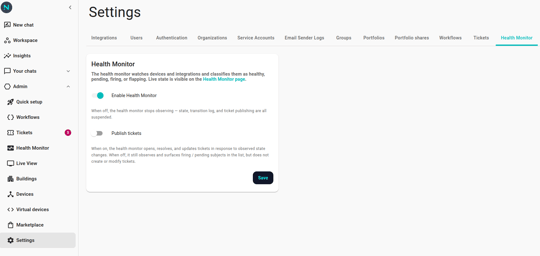
Turn on ticket publishing (separate switch)
Publishing tickets is a deliberate second step. With observation on but publishing off, you see the live picture on the Health Monitor page but no rows land in Tickets. Useful for the first few weeks while you tune debounces and identify flappy subjects you want to silence permanently.
- In Settings → Health Monitor, toggle Publish tickets on.
- Save.
From the next health event onward, a confirmed-unhealthy subject opens a ticket in Tickets. Existing subjects already in Firing won't retroactively get a ticket; this only affects new firings.
Verify it's wired up
Two quick checks:
- Live status. Open the Health Monitor page. You should see at least one row per registered device or integration. If the page shows the educational hero only, observation hasn't kicked in yet — wait a minute and reload.
- Test fire. Pick a non-critical device (a spare button or test sensor). Unplug it. Within the open-debounce window (default 60s) you should see the subject transition Healthy → Pending open → Firing. If publishing is on, a ticket appears in Tickets.
Note: If you can't reach the Health Monitor page or the toggle is greyed out, your account doesn't have permission to configure the policy in this organization. Ask whoever administers Neowit for your org.
Understand the timing rules
The debounce windows and flap thresholds aren't per-org settings — Neowit tunes them across all orgs. What they are today, and what they mean for your tickets, lives in Policy settings. If your environment runs into them in a way that hurts you, the right moves are to silence subjects that flap for known reasons (see Silences) and to talk to support if the defaults don't work for your org.