
Pick the right path
Three onboarding flows; pick whichever matches what you have:
| You have | Use |
|---|---|
| A device already on TTN (someone created it in the TTN console, or it was claimed previously) | Adopt |
| The device's DevEUI, JoinEUI, and AppKey on paper or in a vendor portal | Register |
| A TR005 QR sticker on the device | Claim |
The cascade picker (Vendor → Model → Hardware → Firmware → Region → Frequency plan) is the same for all three. The difference is what happens behind the scenes.
Glossary
- Adopt — start tracking an existing TTN device in Neowit. Nothing changes on TTN.
- Register — create a new device on TTN through Neowit's wizard. Neowit calls TTN's Identity, Network, and Join servers to provision it.
- Claim — onboard a device using a TR005 QR sticker. Neowit asks TTN's Device Claiming Server to transfer the device from the manufacturer to your application.
Adopt an existing device
- In Settings → Integrations → The Things Network, open the integration card.
- Filter the device list to Discovered. These are devices Neowit found on TTN but doesn't yet track.
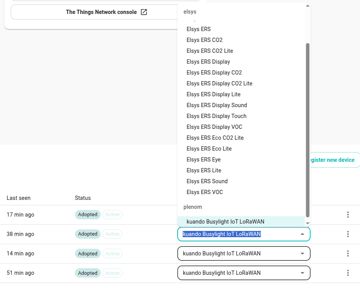
- Find the row for the device you want. Pick Plenom → kuando Busylight IoT LoRaWAN in the Model dropdown.
- The row's badge flips to Adopted. Nothing changes on TTN; only Neowit's view changes.
Register a new device
Use this when the device isn't on TTN yet and you have its credentials on a sticker or from the manufacturer.
- On the integration card, click Register new device.
- Step 1 — Cascade. Pick Vendor (Plenom), Model (kuando Busylight IoT LoRaWAN), Hardware version, Firmware version, Region, and Frequency plan. For Busylight, only HW 1.2 is currently supported. Region determines the frequency-plan options (see below).
- Step 2 — Credentials.
- Name — a label Neowit and TTN will both show.
- DevEUI — 16 hex characters (e.g.
2020203933140402). - JoinEUI — 16 hex characters (e.g.
70B3D57ED1000000). - AppKey — 32 hex characters. Neowit validates each field before submission. Wrong length or non-hex characters fail fast with a clear hint.
- Step 3 — Review and Register. Click Register; Neowit provisions the device end-to-end (Identity Server → Network Server → Join Server). On success the device appears in the Devices table marked Adopted.
Note: If Register fails partway through, Neowit cleans up the partial state on TTN before returning the error. You can retry safely.
Some devices take 1–5 minutes to complete their first Join after registration — the gateway must have airtime available in the RX1/RX2 windows. If the device hasn't joined after 5 minutes, see Device states → Stuck on Join.
Claim with a TR005 QR sticker
Use this when the device ships with a TR005 QR code (most modern LoRaWAN devices do).
- On the integration card, click Register new device.
- In Step 1, click the camera icon above the cascade.
- Scan the TR005 sticker on the device. Neowit decodes the DevEUI, JoinEUI, and Claim Authentication Code (CAC) and pre-fills the cascade where it can.
- Finish the cascade (pick the Region and Frequency plan for your installation).
- Click Claim. Neowit calls TTN's Device Claiming Server, which transfers ownership of the device from the manufacturer to your application. The device row appears Adopted on success.
Same Join timing as the Register flow: a freshly-claimed device usually joins within 1–5 minutes; if not, see Device states → Stuck on Join.
Frequency plans for the Busylight
The Busylight ships in four regional variants. The cascade picker filters the plan list to your selected region:
| Region | Recommended frequency plan |
|---|---|
| EU868 | EU_863_870_TTN |
| US915 | US_902_928_FSB_2 |
| AU915 | AU_915_928_FSB_2 |
| AS923 | AS_923_2 |
The Busylight uses LoRaWAN MAC 1.0.3, Class C, and FPort 15 in all regions. Other plans listed in the dropdown are available if your gateway uses a non-default channel mask.