
What a ticket is
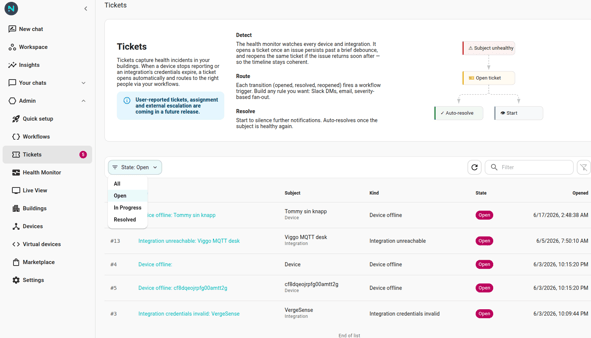
A ticket is one row representing one incident. It carries:
- State — Open, In Progress, or Resolved. The team works the ticket through these states.
- Source — where the ticket came from:
Health monitor,User, orWorkflow. Different sources mean different ownership and lifecycle expectations. - Subject — the device / integration / space / other entity the incident is about.
- Kind — operational category (Device offline, Integration credentials invalid, Multiple devices offline, User report, …). Workflow-opened tickets can supply a free-form kind.
- Timeline — chronological list of every event: opened, started, resolved, reopened, comments, description edits.
- Description — a markdown body. Editable; edits land on the timeline.
- Sequence — a per-org running number (
#42) used in URLs and copy. Use this for human references.
Where tickets come from
Today, four sources:
- Health monitor — fires automatically when a device or integration goes unhealthy past the debounce window. See the Health Monitor KB.
- User — a person clicks "Report issue" (when that flow is enabled) and files a ticket directly.
- Workflow — a workflow's Open Ticket action files a ticket from an external signal (a scheduled check, an integration's event). See Open Ticket from external check.
- Platform outage (future) — a backoffice-declared "platform X is down" surface. Not shipped yet; the word "outage" is reserved for it.
What you do with a ticket
- Triage — read it in the Tickets list, click through to detail. Decide if it's actionable.
- Start — flip Open → In Progress to signal "I'm on it." Recipient: anyone subscribed to the
Ticket Startedworkflow trigger. - Comment — append a note. Markdown, immutable.
- Edit the description — keep the body up to date as you investigate. Edits land on the timeline.
- Resolve — close it. If the underlying subject is still unhealthy, the health monitor may reopen the same ticket (inside the reopen window).
- Reopen — pull a Resolved ticket back to Open when the issue recurs.
Workflows that fan out
Every state transition emits a workflow trigger: Ticket Opened, Ticket Started, Ticket Comment Added, Ticket Resolved, Ticket Reopened. Wire each to your notification channel of choice. Worked example: Alert when a device goes offline.
For workflow-driven mutations, three action nodes exist: Open Ticket, Resolve Ticket, Add Comment. See the workflows KB's action catalog.