
The two markdown surfaces
A ticket has two distinct markdown areas:
- Description — the main body. Set when the ticket opens. Editable later by anyone with permission to change the ticket. After an edit, a small "Last edited by … at …" note appears above the Description body so readers know it's been revised; the prior text isn't archived on the page.
- Comments — short notes appended to the timeline. Immutable once posted.
Both surfaces accept the same dialect: GitHub-Flavored Markdown (GFM) — bold, italics, lists, code blocks, tables, autolinks, task lists. See GitHub's writing and formatting guide for a friendly reference.
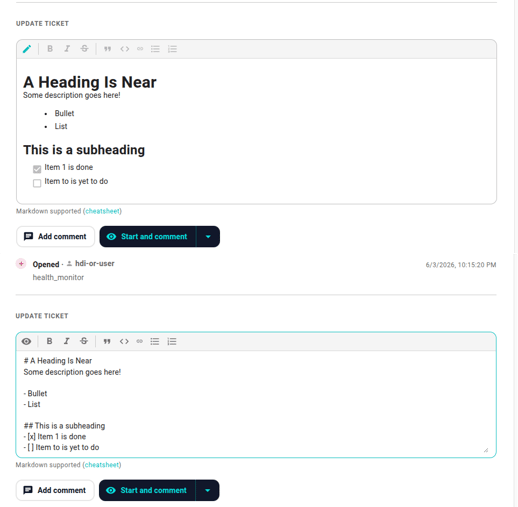
Editing the description
Click the pencil icon next to the Description heading on the detail page. An inline editor opens with the current body pre-populated. Edit, click Save. The "Last edited by … at …" note above the Description body updates to record who made the change and when.
If you don't see the pencil, your account doesn't have permission to edit ticket descriptions in this organization. Ask whoever administers Neowit for your org.
Posting a comment
Use the editor at the bottom of the detail page:
- Type the comment.
- Click Add comment.
- The comment lands as an immutable event on the timeline.
If the comment editor is empty when you click Start / Resolve / Reopen, those buttons fire without a note. With text in the editor, the same buttons attach the text as the state-change's note.
Linkifying ticket references
When you type #42 in a comment or description body and save, the editor automatically rewrites it to a clickable markdown link to ticket #42. This is idempotent — the same body re-saved doesn't accumulate further linkifications. Use it to cross-reference incidents in a postmortem.
What the renderer supports
- Headings (H1 through H3 render visually; H4+ are flattened).
- Bold (
**bold**), italic (*italic*), strikethrough (~~strike~~). - Inline code (
`inline`) and fenced code blocks. - Bullet and numbered lists, including nested.
- Tables (small ones — large tables degrade on mobile).
- Links (autolinks for bare URLs; explicit
[text](url)for branded link text). - Task lists (
- [ ] itemand- [x] item). Cascade parents use these for the recovery checklist. - Blockquotes for callouts.
What's stripped at save time:
- Raw HTML (
<div>,<script>, etc.). Only the markdown syntax survives — anything that would render as HTML is removed before the body is saved.
Markdown vs plaintext in workflow actions
When a workflow's Add Comment or Open Ticket action writes into a ticket, the author picks between plain text and markdown at workflow-build time. Either way the content lands in the same field; the choice is about which editor widget the workflow author gets (a plain textarea vs a markdown preview pane). See the workflows KB's Actions article for the picker.