
The three states
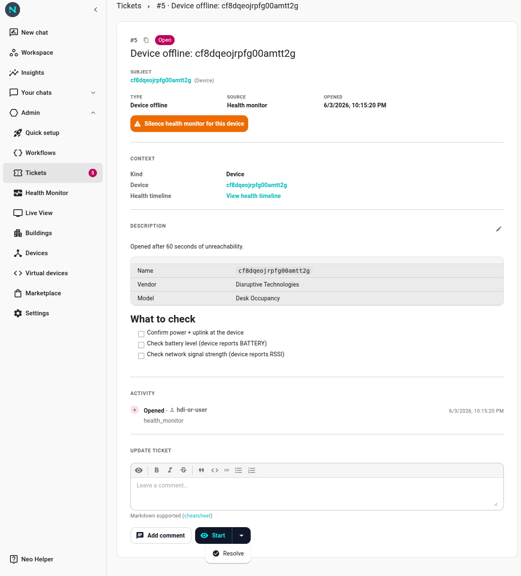
- Open — fresh ticket, no one has explicitly taken it. Default state when the health monitor or a workflow opens one.
- In Progress — someone has clicked Start. Signals "an agent is working on this" to other operators and triggers the
Ticket Startedworkflow if you have one wired. - Resolved — closed. Health-monitor tickets auto-resolve when the subject recovers (after the resolve debounce); user / workflow tickets resolve when an operator clicks Resolve or a workflow's
Resolve Ticketaction runs.
Note: A future round will add a
Pendingstate (waiting on someone) and a terminalClosedstate for tighter alignment with Zendesk / ServiceNow / Jira Service Management. Until then, the three states above cover every transition.
The buttons
| From state | Button | Goes to | Notes |
|---|---|---|---|
| Open | Start | In Progress | Fires the Ticket Started trigger. |
| In Progress | Move to Open | Open | Undoes an accidental Start. No trigger fires — workflows don't re-page on an undo. |
| Open | Resolve | Resolved | Fires Ticket Resolved. The health monitor may reopen the same ticket if the subject is still unhealthy. |
| In Progress | Resolve | Resolved | Same as above. |
| Resolved | Reopen | Open | User-driven undo of Resolve. Bypasses the reopen window. Fires Ticket Reopened. |
| any | Add comment | (no state change) | Appends a Comment entry to the timeline. Allowed in every state, including Resolved (post-mortem notes). |
Double-clicks and races are safe
Clicking Start twice produces one timeline entry, one state change. Clicking Resolve on a ticket someone else just resolved exits quietly without another entry. Mobile flakiness and double-taps don't put the ticket into an inconsistent state.
Comment-alongside-a-state-change is two steps
When you type a note into the editor and click Start / Resolve / Reopen, the UI appends the comment first and then applies the state change. So if the state change fails (rare, but possible — for example a race with another operator who just resolved the same ticket), the typed comment is preserved on the timeline and you can retry the state change.
The auto-reopen window
If a health-monitor-opened ticket is resolved and the same subject goes unhealthy again inside the reopen window (default 60 minutes — configurable per org), the original ticket reopens with a Reopened entry on the timeline. Outside the window, a new ticket fires instead. The previous resolution stays in the history.
User-clicked Reopen ignores the window — you explicitly said "this is the same incident."
Why a button is missing
If you don't see Start / Resolve / Reopen, your account doesn't have permission to change ticket state in this organization. Ask whoever administers Neowit for your org.
If you see Start but no Resolve, the ticket is already Resolved and you're looking at a stale page. Refresh and the buttons will update.