
The five states
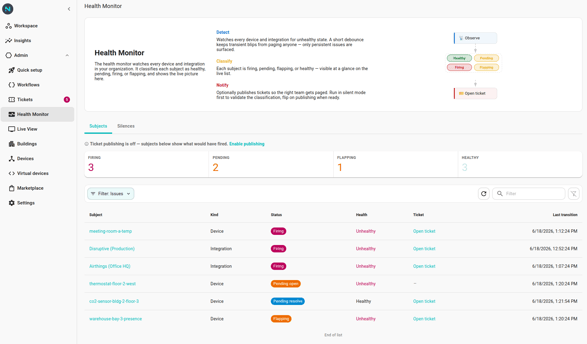
- Healthy — The subject is reporting normally. No ticket open.
- Pending open — The subject just went unhealthy. The monitor is debouncing: if it stays unhealthy past the configured open window, a ticket fires; if it flips back to healthy first, the debounce cancels and the subject returns to Healthy.
- Firing — The subject is confirmed unhealthy and has an open ticket in Tickets. The monitor will auto-resolve the ticket when the subject recovers (after passing through Pending resolve).
- Pending resolve — The subject just recovered after firing. The monitor is debouncing the recovery: if it stays healthy past the configured resolve window, the open ticket auto-resolves. If it flips back to unhealthy first, the resolve cancels.
- Flapping — The subject is crossing healthy↔unhealthy faster than the flap threshold allows. The auto-resolve window is extended (the post-flap stable window) so brief recoveries don't close the ticket prematurely.
How states change
Live, by event:
- Healthy → Pending open — first unhealthy reading for an otherwise-healthy subject.
- Pending open → Firing — unhealthy reading persisted past the open debounce.
- Pending open → Healthy — recovered inside the debounce. No ticket.
- Firing → Pending resolve — first healthy reading on a firing subject.
- Pending resolve → Healthy — stayed healthy past the resolve debounce. Open ticket auto-resolves.
- Pending resolve → Firing — went unhealthy again before resolving. Ticket stays open.
- any → Flapping — the subject crossed the flap threshold inside the flap window.
- Flapping → Healthy — stable past the post-flap stable window. Ticket auto-resolves.
Reading the detail page
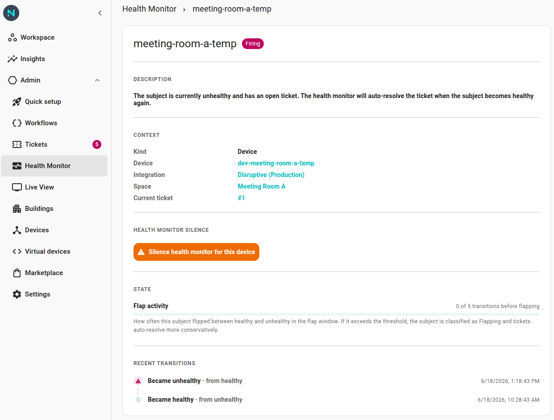
Click any subject on the Health Monitor page to see its detail:
- Header chips — current status + the health state's color cue.
- Description — a plain-English explainer of what the current status means and what the monitor is going to do next.
- Context — links to the device / integration / space the subject is about.
- State — flap activity progress bar (current flap count vs threshold) and the pending-open / pending-resolve timers if they're set.
- Silence — the affordance to mute the monitor for this subject during planned maintenance. See Silences.
- Recent transitions — a chronological timeline of health-state changes.
Why a subject is in a Pending state for so long
The debounce windows are deliberately generous. The open debounce is ~60 seconds — long enough to absorb a single missed heartbeat or a brief network blip. The value is platform-tuned by Neowit and isn't per-org; see Policy settings for the current value and the reasoning.
Why a subject is Flapping
A subject crossing healthy↔unhealthy more times than the flap threshold inside the flap window gets the Flapping classification. The post-flap stable window then holds the open ticket open until the subject has been continuously healthy for long enough — so a brief in-between recovery doesn't auto-close the ticket and re-open it on the next dip.