
What the page shows
The columns:
- # — per-org running number. Click to open the detail page. Pasteable into chat as
#42. - Title — one-line description. For health-monitor tickets, this is
Device offline: <name>or similar. For workflow- or user-opened tickets, the title is whatever was supplied. A small chip next to the title reads Multiple devices offline when the ticket is a cascade parent. - Subject — the device / integration / space / other entity the ticket is about, with the subject kind as a caption.
- Kind — humanized failure mode (Device offline, Integration credentials invalid, Integration unreachable, Multiple devices offline, User report, or a workflow-supplied free-form value).
- State —
Open,In Progress, orResolved. Color-coded. - Opened — relative time the ticket opened.
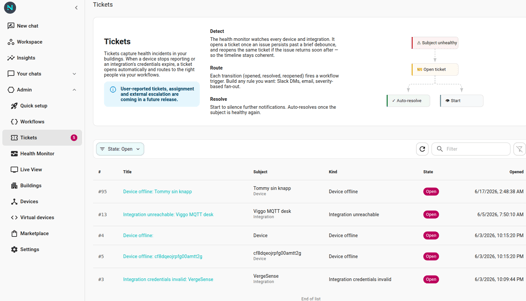
Filtering
Top of the page:
- State —
Open/In Progress/Resolved/All. Defaults toOpen. - Search — substring match across title, subject name, subject id. Useful for "show me everything about meeting-room-a-temp".
The list refreshes automatically every ~30 seconds so external changes (workflow auto-resolves, another admin acking a ticket) appear without a manual refresh.
The sidebar badge
The sidebar's Tickets nav entry shows a small badge with the count of Open tickets for the org. You can tell at a glance whether the org needs attention.
Cascade parents
A ticket that rolled up many device-offline events on the same integration carries a Multiple devices offline chip next to its title. The chip is the only visual signal — there are no member tickets in the list to expand to. The affected-devices checklist lives on the parent's detail page. See Cascade rollups.
Workflow-opened tickets
Tickets filed by an Open Ticket workflow action carry Workflow in the source chip on the detail page. The Subject column shows whatever the workflow author supplied — including other for non-Neowit entities.
- No bulk select / bulk ack. Each ticket is acted on individually from its detail page.
- No saved filters. The State filter and search resets per session.
- No priority column. Tickets are unordered apart from
Opened. Use workflow conditions to route different kinds to different recipients.