
Before you start
- A Fagerhult / Organic Response API token with read and write access for your buildings.
- Admin access on the Neowit organization.
- The building hierarchy (building → floor → node) must already exist on the Fagerhult side. The "scope" target mode in Set Lights relies on this — Neowit uses one device as an anchor and resolves the floor or building around it.
Connect Fagerhult
- In the left navigation, open Settings → Integrations.
- Click Add integration and pick Fagerhult.
- Paste your API token. Optionally set a friendly name.
- Click Save. Neowit verifies the token and pulls the device list.
- The integration card flips to Connected.
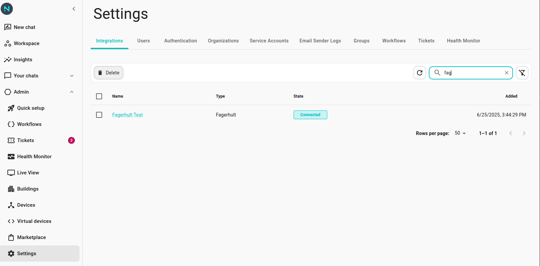
How devices appear
- Each Organic Response node in your building shows up as one device in Neowit. The device's external id has the form
building:floor:node. - Neowit polls Fagerhult every 5 minutes to refresh the device list. New nodes show up on the next poll.
- Click Synchronize on the integration card to force an immediate refresh.
Control lights
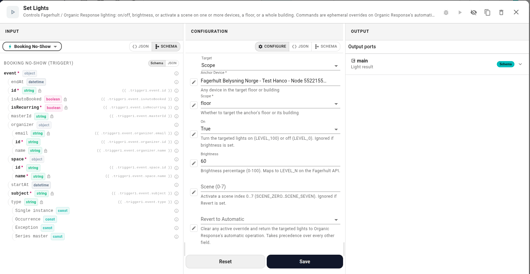
Use the Set Lights action in your workflow. Three things to know:
- Target — pick Devices and select one or more individual nodes, or pick Scope and select an anchor device plus floor or building. Scope mode lets one anchor stand in for everything on its floor / in its building.
- Commands — set
on(true/false),brightness(0–100),scene(0–7), orrevert(true). Precedence is revert > scene > brightness > on, so a single action either reverts, runs a scene, dims, or toggles — set the highest-priority field that applies. - Output —
success(true if every targeted building was updated),command(which command type was sent), andtargetedBuildings(how many buildings the action dispatched to).
Full configuration details in Actions — Set Lights (Fagerhult).
A note on Organic Response
Organic Response runs its own automatic logic — sensing presence and daylight to dim and switch lights. A Set Lights command is an ephemeral override layered on top of that automatic behaviour. To return control to the automatic mode, send another Set Lights with revert = true.
What you can do today
- One Set Lights action.
Not yet supported
- Triggers — workflows can't yet react to Organic Response events (occupancy, daylight thresholds).
- Reading current state — you can't build a condition like "if this floor's lights are on".
- Transition times and per-fixture effects.
- Mixed targets in a single action (e.g. devices A and B plus the rest of floor 3) — chain two Set Lights actions instead.
When Fagerhult stops working
Most issues show up as a red badge on the integration card.
- Not authenticated — the API token was revoked or rotated. Edit the integration, paste a fresh token, and save.
- Device not found — a referenced device id no longer exists on the Fagerhult side. Click Synchronize, then re-pick the device anywhere it's used.
- Building hierarchy mismatch — Set Lights with scope=floor or scope=building failed because the anchor device's floor/building can't be resolved. Re-sync, and check that the device still belongs to a building in the Fagerhult console.
- Unable to connect — Fagerhult cloud was unreachable on the last check. Usually transient; retry Synchronize.
See Integration disconnected for the general recovery flow.