
The layout
Top-down:
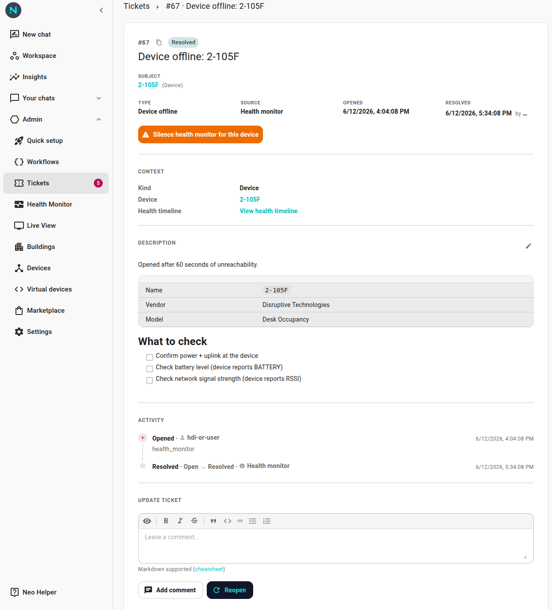
- Header —
#42, copy-link button, state chip (Open/In Progress/Resolved). The state chip color follows the standard semantic palette: red for open, amber for in-progress, green for resolved. - Title — large heading. For health-monitor tickets, "Device offline: meeting-room-a-temp" etc. Cascade parents read "Multiple devices offline on integration ."
- Metadata strip — Subject (linked to the device / integration / space / other entity), Type (humanized kind), Source (Health monitor / User / Workflow), Opened (relative time), Resolved (when applicable, with the resolver's name).
- Silence button — for device and integration subjects, a button below the metadata to silence the health monitor for that subject. See Silences.
- Context — one row per linked entity: Kind, Device (with link to
/devices/{id}), Integration (with link to/settings/integrations/edit/{id}), Space (with link to/locations/{id}), Health timeline (when subject is a device or integration; links to/health-monitor/{kind}/{id}). - Description — markdown body. Edit affordance (pencil) opens an inline editor with Save / Cancel.
- Activity timeline — chronological log of every change: Opened, Started, Resolved, Reopened, Moved to Open, and Comments. Each entry shows who made the change (a robot badge on automated entries from the health monitor or a workflow, a person icon for changes made by a teammate) and when. (Description edits don't sit on this timeline — they're surfaced as a small "Last edited" note above the Description body.)
- Update ticket — for non-resolved tickets, a markdown editor for a comment + state-change buttons (Start / Resolve / Reopen / Move to Open / Add comment).
Start, Resolve, Reopen, Move to Open
Five buttons can appear, depending on state — see State and transitions.
Comments
The shared markdown editor at the bottom serves both comments and state-change "and comment" affordances. Click Add comment to leave a comment without flipping state; click Start / Resolve with text in the editor and the typed text is appended as a comment before the state change fires, so a failure on the state change preserves the comment in the timeline.
Comments are immutable. There is no edit affordance. Post a follow-up comment to correct.
See Comments and descriptions for the markdown rules.
The copy-link button
Next to the #42 in the header. Copies a deep link to the ticket URL into your clipboard. Paste into Slack or email; the recipient clicks through to land directly on the detail page.
The live picture
The detail page refreshes itself every ~30 seconds. If a workflow auto-resolves the ticket or another admin starts it while you're reading, the page updates without a manual refresh.
Cascade parents
When the ticket is a cascade parent (rolled up many device-offline events), the description body carries a recovery checklist as a GFM task list. Items tick off automatically as members recover. The status banner at the top of the description reads Cascade status: X of Y devices recovered. See Cascade rollups.