
What this workflow does
When a booking in Neowit transitions to the "no-show" state, this workflow:
- Checks whether the meeting was auto-booked (you may want to skip human-scheduled meetings).
- If yes, sends the organizer a short Slack DM letting them know.
It's a clean template for any "notify someone when an event happens" pattern.

Prerequisites
- Workflows enabled for your org. See Enable workflows for your org.
- Slack connected in Settings → Integrations.
- Optional: a test meeting you can mark as no-show, or you can use the Run workflow button.
Build it
1. Create the workflow
Workflows → New workflow → name No-show notifier → Create.
2. Add the trigger
Drag Booking — no-show onto the canvas. No settings to configure.
3. Add a filter
Drag If onto the canvas. In its settings, add one condition:
- Type: Boolean
- Operation: Is True
- Value: trigger.event.isAutoBooked
Combine operation stays on all.
Drag an edge from the trigger's output to the If node's input.
4. Add the Slack action
Drag Slack → Send DM onto the canvas. Settings:
- Email — trigger.event.organizer.email (use the data-reference picker).
- Content type — text.
- Content —
Hi! Your meeting {{ .trigger1.event.subject }} in
{{ .trigger1.event.space.name }} was marked no-show. If you no longer
need the slot, please release the booking so others can use the room.
Drag an edge from the If node's true port into the Send DM node.
5. Test
Click Run workflow in the toolbar. In the trigger's input dialog, paste:
{
  "event": {
    "id": "test-1",
    "subject": "Weekly sync",
    "isAutoBooked": true,
    "organizer": { "email": "you@example.com" },
    "space": { "id": "room-3", "name": "Sky room" }
  }
}
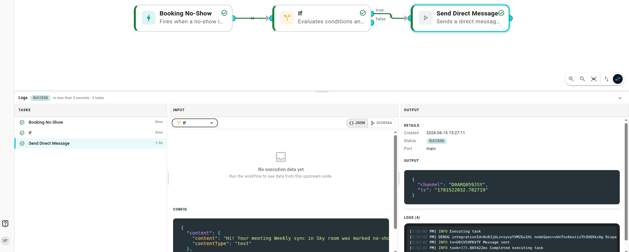
Click Run. All three node cards should turn green and a Slack DM should arrive within a few seconds.
6. Enable it for real
Click Save. In the dialog, turn Enabled on, add a short commit message, and save. From the next real no-show event onwards, the workflow runs automatically. See Publishing and versions for the full Save flow.
Variations
- Swap the condition to filter by space, floor, or organizer email domain — see Conditions.
- Fan out a second action from the trigger (e.g. also turn the room's Hue scene red for 10 seconds) by drawing another edge from the If node's true port.
- Send a channel message instead of a DM using Slack → Send to channel.
When it doesn't fire
If you mark a real booking as no-show and nothing happens:
- Check the workflow is committed, not just saved as a draft. See Publishing and versions.
- Check the Executions tab on any node — is the workflow running but routing to the false branch? Your condition may be stricter than you think.
- See Workflow didn't run for more diagnostics.