
What this workflow does
- A Ticket Opened trigger fires every time the health monitor opens a new ticket in your org.
- An If condition routes to true only when the ticket is about a device (so integration tickets are ignored here — they typically need a different recipient).
- A Send Direct Message action DMs the FM rota with the ticket title and a link back to the ticket page where the recipient can start or resolve.
The same shape works for the other lifecycle triggers (Ticket In Progress, Ticket Comment Added, Ticket Resolved, Ticket Reopened) — duplicate this workflow and swap the trigger.

Prerequisites
- Workflows enabled for your org. See Enable workflows for your org.
- Tickets enabled for your org. See Tickets.
- Slack integration connected so the action can DM a recipient.
Build it
1. Create the workflow
Workflows → New workflow → name Device offline — DM the FM rota → Create.
2. Add the Ticket Opened trigger
- Add node → Triggers → Ticket Opened.
- No settings to configure — the trigger fires on every new ticket in your org.
3. Add the If condition
- Add node → Conditions → If.
- Add one row:
- Value 1 — data-reference pick
trigger.ticket.subjectKind. - Operation — string equals.
- Value 2 —
device.
- Value 1 — data-reference pick
- Connect the trigger's output to the If's input.
Swap device for integration if you want a separate workflow that routes integration-credential alerts to a different recipient (typically the integration owner, not the FM rota).
4. Add Send Direct Message
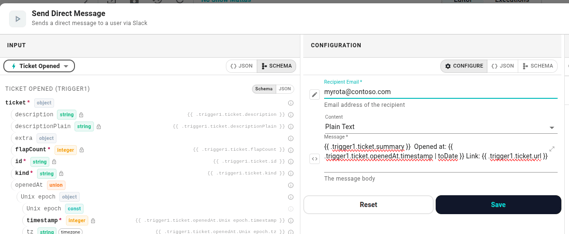
- Add node → Actions → Send Direct Message.
- Settings:
- Recipient — your FM rota's Slack handle, group, or user id.
- Message — a template using the ticket envelope. A good starter:
{{ .trigger.ticket.summary }} Opened at: {{ date "2006-01-02 15:04" .trigger.ticket.openedAt "Europe/Oslo" }} Link: {{ .trigger.ticket.url }}
- Connect the true port of If to the action.
The link in the DM is pre-built by the ticket service — recipients click it and land on the ticket's detail page where they can start or resolve directly.
5. Save and enable
Click Save, leave Enabled on, write a commit message, and the workflow takes over.
Variations
- Two DMs in one workflow. Add a second branch off the If's false port (integrations) and DM a different recipient. Cleaner than two workflows when both routes are short.
- All transitions, one channel. Duplicate this workflow for Ticket In Progress, Ticket Comment Added, Ticket Resolved, and Ticket Reopened. Each carries the same
ticketenvelope; reuse the template body and add a short prefix ("In Progress", "Comment", "Resolved", "Reopened") so the channel reads like a status log. - Throttle flap noise. Branch on
trigger.ticket.flapCount > Nin an If condition and add a Cooldown keyed ontrigger.ticket.subjectIdso a flapping subject doesn't fire the DM over and over. See Stateful conditions. - Route by space. If you have separate FM teams per building, add a second If on
trigger.ticket.extra.spaceIdand DM the right team. Theextrablock is populated by the health monitor for device tickets.
When it doesn't fire
- No DM arrived. Open Executions. If the trigger never fired, check the ticket actually opened in Tickets — the health monitor's debounce window (default 60s) may have absorbed a brief outage. If the If routed to false, the ticket's
subjectKindwasn'tdevice— most commonly an integration ticket. - DM landed on every flap. The flap-detector denormalises the count onto
trigger.ticket.flapCountrather than firing a separate trigger, so you still see multiple Ticket Opened events during a flap window. Add a Cooldown keyed ontrigger.ticket.subjectId(or branch onflapCount > Nand route those to a quieter channel) to suppress repeats during a flap. - Ticket Resolved fires for tickets the team didn't see opening. That's expected — the open-debounce may have been raised, or the org-level switch was off when the open would have fired. The resolve still fires because the ticket exists in the DB. Lower the open-debounce in Settings → Tickets if this happens too often.