
When to use which
- Is Same Space — match exactly one space.
- Is On Floor — match every space on a particular floor.
- Is In Building — match every space in a particular building.
- Space Is Occupied — is a particular space (or anything underneath it) currently occupied right now? (Sensor-based.)
- Space Is Booked — is a particular space (or anything underneath it) currently in an ongoing booking? (Calendar-based.)
All behave like the standard If condition: one input, two outputs (true and false). Wire your action to the true port; leave false unconnected (or send it to a different action) depending on what you want for non-matching events.
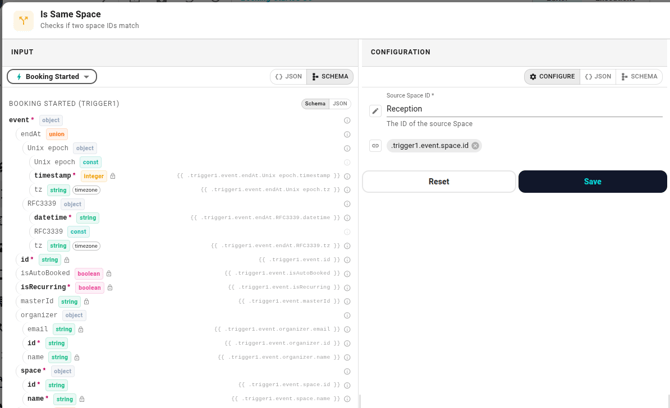
Is Same Space
Compares two space IDs and routes to true if they're equal.
Configuration:
- Source Space ID — required.
- Target Space ID — required.
The names suggest a direction; there isn't one. The two slots are interchangeable in the equality test. The typical setup is:
- Leave one slot as a fixed space — pick from the dropdown (say, Reception).
- Switch the other slot's mode button to Data reference and point it at the trigger's space — event.space.id for booking triggers, space.id for occupancy triggers.
If you're not sure how the mode button works, see References and templates.
Is On Floor
Routes to true when a given space sits on a given floor.
Configuration:
- Floor ID — required, picked from the floor dropdown.
- Space ID — required. Almost always a data reference to the trigger's space.
The condition recursively walks every descendant of the floor, so deep nesting (floor → zone → room → desk) all matches without extra setup.
Is In Building
Routes to true when a given space sits anywhere in a given building.
Configuration:
- Building ID — required, picked from the building dropdown.
- Space ID — required. Almost always a data reference.
Same recursive behaviour — desks inside zones inside floors inside the building all match.
Space Is Occupied
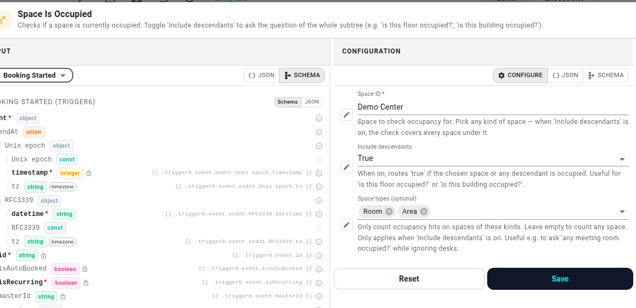
Probes the live occupancy state. Routes true when the chosen space is currently occupied.
Configuration:
- Space ID — required. Pick any kind of space: a single room, an entire floor, a whole building, even a desk cluster.
- Include descendants — off by default. Turn it on to widen the question from "is this exact space occupied?" to "is this space or anything underneath it occupied?". With this on, picking a building answers "is the building occupied?"; picking a floor answers "is the floor occupied?".
- Space types — optional, multi-select. Only meaningful when Include descendants is on. Restricts which kinds of spaces count: pick Room to ask "any meeting room occupied?" while ignoring desks; pick Room + Desk to count both. Leave empty to count everything in the subtree.
The chosen space itself counts. If you pick a room and leave the toggle on, an occupancy event in the room itself returns true.
Occupancy data is cached in-memory and refreshes a few times a minute, so the answer reflects the current sensor state without a per-run database lookup.
Space Is Booked
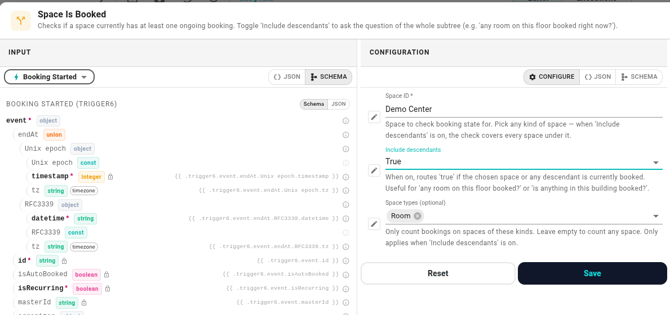
Probes the live booking state. Routes true when the chosen space currently has at least one ongoing booking.
Configuration:
- Space ID — required. Pick any kind of space: a single room, an entire floor, a whole building, even a desk cluster.
- Include descendants — off by default. Turn it on to widen the question from "is this exact space booked?" to "is this space or anything underneath it booked?". With this on, picking a floor answers "any room on this floor booked right now?"; picking a building answers "is anything in this building booked?".
- Space types — optional, multi-select. Only meaningful when Include descendants is on. Restricts which kinds of spaces count: pick Room to ask "any meeting room booked?" while ignoring desks; pick Room + Desk to count both. Leave empty to count everything in the subtree.
Bookings that we declined as the resource (auto-decline) don't count. Those are an artefact of the booking automaton itself, not real meetings — a counter-intuitive answer in either direction would be wrong, so they're filtered out before the count.
When to use this versus Space Is Occupied
The two conditions answer different questions and can disagree:
- Space Is Occupied — physical presence right now. Sensor signal.
- Space Is Booked — calendar reservation right now. Booking signal.
A room can be:
- Booked and occupied (a meeting is actually happening).
- Booked but empty (no-show or someone forgot to release).
- Not booked but occupied (drop-in chat).
- Neither (the common idle state).
Pick the one that matches what you actually care about. Or chain both (using an If condition to combine) when you want, say, "booked but nobody's there".
Booking data is cached in-memory and refreshes within seconds of a booking change.
Common patterns
- Notify only for one floor. Booking No-Show trigger → Is On Floor (Floor = 3rd floor, Space = event.space.id) → Send DM. Anything off the third floor short-circuits to false.
- Different actions per building. Booking Started trigger → Is In Building (Building = Oslo HQ, Space = event.space.id) → Slack channel A on true. Then the false port flows into a second Is In Building for Bergen Office → Slack channel B. Chain as needed.
- Multi-floor allow-list. No "in this list of floors" condition exists yet. Today this needs one Is On Floor per floor, OR'd by chaining the false branches.
What about a single specific space?
If you only ever care about exactly one space, Is Same Space with one fixed slot works — but for readability the standard If condition with event.space.id equals <id> reads equally well. Pick whichever your team finds clearer.
When it fails
These conditions perform database lookups to look up the floor or building tree, so a few runtime errors are possible:
- "Space not defined" — the configured floor/building id resolved to an empty string. Check the form.
- "Failed to get spaces" — entitydb couldn't list spaces. Usually a transient backend issue; retry the workflow.
- The container picked isn't actually a floor (for Is On Floor) or a building (for Is In Building) — the condition just routes to false with no error. If this surprises you, double-check what you picked in the dropdown.