
Why these are different
A regular condition (the If node) only looks at the data passed into the current run. Stateful conditions also remember what they've seen before. They store a tiny piece of state — a counter, a timestamp, a previous value — and use it to decide which output to take.
The state lives per workflow. When you delete a workflow, its stateful condition memory goes with it.
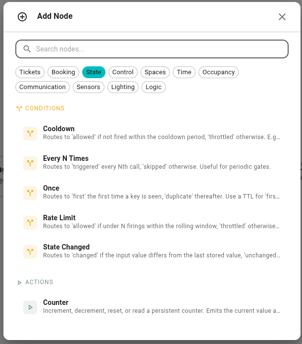
Every N Times
Routes to triggered every Nth time it runs, skipped otherwise. Use it when a trigger fires more often than you care about and you want to act periodically.
- N — fire every Nth run. Default 10.
- Key (optional) — leave blank for one counter per node placement; set a template (e.g.
space-{{ .trigger.event.space.id }}) for separate counts per entity.
Example: post a summary to Slack on every 50th elevator-call event. Wire triggered → Post To Channel; leave skipped unconnected.
Cooldown
Routes to allowed the first time it fires inside a window, throttled for everything else until the window passes. Use it to silence repeats without missing the first one.
- Duration —
1h,15m,30s. Default1h. - Key (optional) — separate cooldowns per key. Default: per node placement.
Example: alert the facilities channel at most once per hour when CO₂ spikes. Wire allowed → Post To Channel; leave throttled unconnected.
Rate Limit
Routes to allowed while you're under N firings in the current window, throttled when the budget is spent. The budget resets at the start of each fixed window.
- Max per window — how many firings per window. Default 10.
- Window —
1m,1h,24h. Default1m. - Key (optional) — separate rate limits per key. Default: per node placement.
Example: cap a "set lights" workflow at 10 changes per minute so a noisy sensor can't spam the gateway. Wire allowed → Set Light; throttled can drop the event or hit a Stop And Fail.
Once
Routes to first the very first time a key is seen, duplicate every time after. Use it to do something exactly once — ever, or once per window.
- Key (required) — usually a template like
device-{{ .trigger.event.device.id }}. Without a unique key the condition fires once and never again. - TTL (optional) — after this duration the key resets and the workflow can fire first again. Leave blank for permanent dedup.
Example: send "we noticed your Hue Bridge went offline" exactly once per bridge per day. Key = bridge-{{ .trigger.event.device.id }}, TTL = 24h.
State Changed
Routes to changed when the input value differs from the last time the workflow saw it, unchanged otherwise. The first call always reports changed (there's no previous value to compare to).
- Value (required) — the value to track. Usually a template like
{{ .trigger.event.occupancy.state }}. - Key (optional) — separate tracked values per key.
Example: only act on transitions, not steady state. A minute-by-minute occupancy trigger → State Changed → Set Light, so the lights only flip when the room actually changes occupancy.
Choosing the right one
| You want… | Use |
|---|---|
| Fire every Nth time | Every N Times |
| At most once per period | Cooldown |
| At most N per period | Rate Limit |
| Exactly once per key (forever, or per window) | Once |
| Only when a value changes | State Changed |